Today I’m going to start first article that will be devoted by very important topic in Hadoop world – data loading into HDFS. Before all, let me explain different approaches of loading and processing data in different IT systems.
Schema on Read vs Schema on Write
So, when we talking about data loading, usually we do this into system that could belong on one of two types. One of this is schema on write. With this approach we have to define columns, data formats and so on. During the reading every user will observe the same data set. As soon as we performed ETL (transform data in format that mostly convenient to some particular system), reading will be pretty fast and overall system performance will be pretty good. But you should keep in mind, that we already paid penalty for this when were loading data. Like example of schema on write system you could consider Relational data base, for example, like Oracle or MySQL.
Schema on Write
Another approach is schema on read. In this case we load data as-is without any changing and transformations. With this approach we skip ETL (don’t transform data) step and we don’t have any headaches with data format and data structure. Just load file on file system, like coping photos from FlashCard or external storage to your laptop’s disk. How to interpret data you will decide during the data reading. Interesting stuff that the same data (same files) could be read in different manner. For instance, if you have some binary data and you have to define Serialization/Deserialization framework and using it within your select, you will have some structure data, otherwise you will get set of the bytes. Another example, even if you have simplest CSV files you could read the same column like a Numeric or like a String. It will affect on different results for sorting or comparison operations.
Schema on Read
Hadoop Distributed File System is classical example of schema on read system.More details about Schema on Read and Schema on Write approach you could find
here. Now we are going to talk about data loading data into HDFS. I hope after explanation above, you understand that data loading into Hadoop is not equal of ETL (data doesn’t transform).
General classification.
I’ve never met some strict classification of tools for data loading and then I’ll introduce my own. Generally speaking there are two types of data loading and data source: Stream and Batch. As batch technologies could be considered: hadoop client, HttpFS API, WebHDFS API, distcp tool working over some share directory, sqoop. Classical example for stream data sources are flume, kafka, Golden Gate. But, let’s moving step by step and start our review with batch technologies.
Hadoop Client
Actually, it’s easiest way to load the data. Hadoop client could be installed on any rpm or deb compatible Linux. Also, with some efforts it could be installed on Solaris and HP-UX. Probably, you will be able to deal with it on other UNIX systems, but I’m not 100% sure about this. So, for loading file from Linux file system to HDFS you just have to run on the source server follow command:
hadoop fs -put /local/path/test.file hdfs://namenode:8020/user/stage
It’s actually easy! But, what if for some reasons (most probably it will be not-technical reasons) you are not able to install hadoop client on your source server? No worry, you have couple options more!
WebHDFS file system
As I just have written, if you still have source server and you still want to load some file from it to the HDFS you could use WebHDFS like an option.
Here you could find complete documentation, but if you are so lazy for reading this, here is my keynote about WebHDFS:
- REST API that provides read and write access to the HDFS. Supports all HDFS operations
- The requirement for WebHDFS is that the client needs to have a direct connection to namenode and all datanodes via the predefined ports (50070 by default)
- Initially invoke NameNode, and then start working through some (choose it randomly) DataNode as gateway
- You can also use common tools to access HDFS
WebHDFS
For example, if you want to load file and in hadoop client dialect it would be, like that:
hadoop fs -put test1 hdfs://scaj43bda02:8020/tmp/test1
with WebHDFS you could run the same operation with follow command:
for me personally, it’s I bit complicated but I think it’s issue of the habits. And actually, syntax is not the main problem. More important and significant follow restriction “client needs to have a direct connection to NameNode and DataNodes”. What if I can’t provide this (for some security reasons, for example)? I think in this case answer will be: use HttpFS.
HttpFS file system.
In case of HttpFS you will have additional service in HDFS, that will provide role of gateway between your client and Hadoop cluster:
HttpFS process in Cloudera Manager (part of HDFS)
HttpFS
In case of HttpFS you have to have access only to one node and major use cases for it are:
- Transfer data between HDFS clusters running different versions of Hadoop
- Read and write data in HDFS in a cluster behind a firewall
Syntax is very similar with WebHDFS. For example, for load file test.txt in HDFS directory /tmp/test11, you have to run:
Easy! I could guest that many of you are very curious about performance degree of this approaches. I will devote the next paragraph of this.
Hadoop client vs WebHDFS vs HttpFS performance.
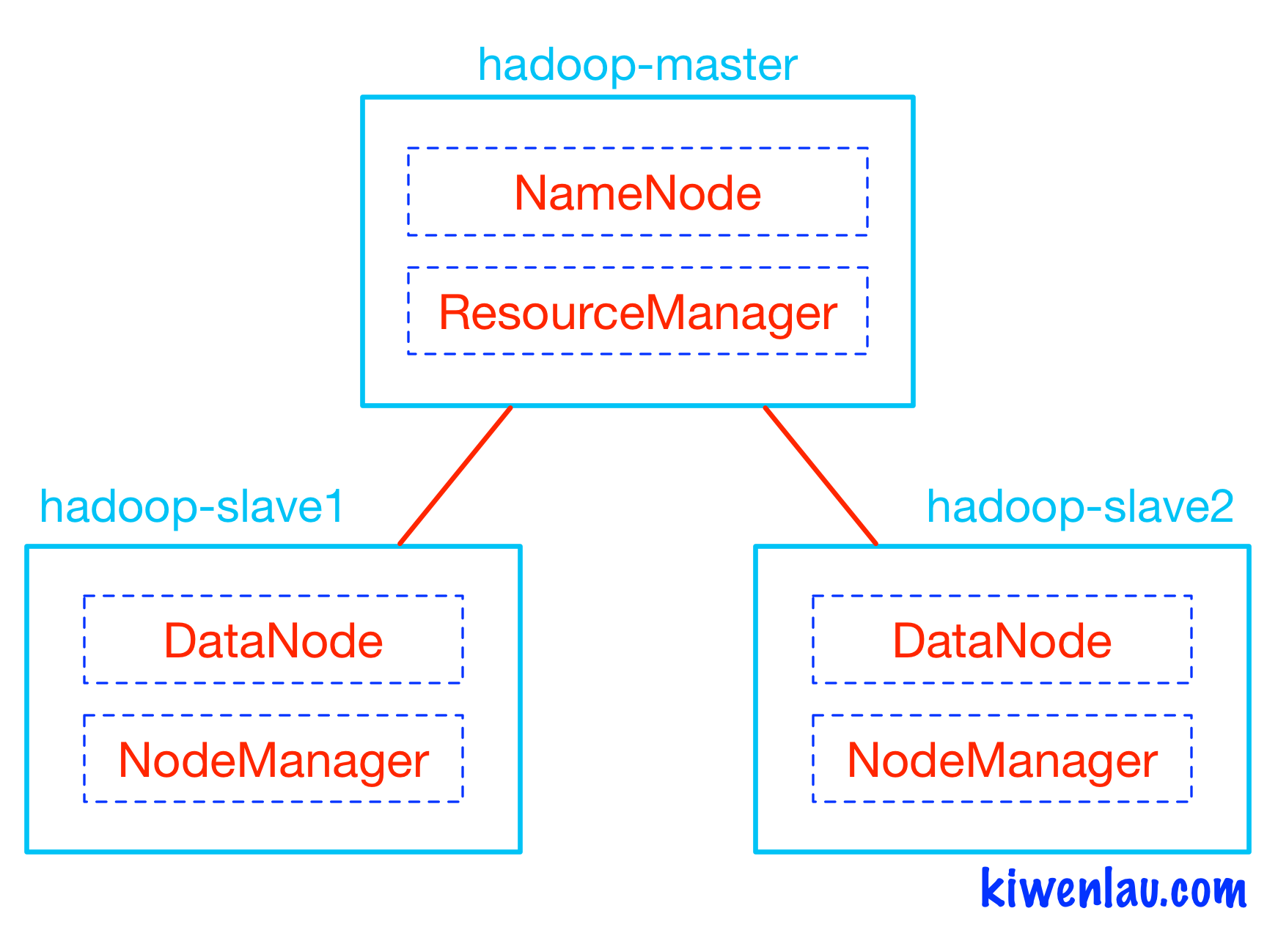
I think it will be proper to start this section with explanation of my test stand. It’s three node CDH cluster plus one edge node. On edge node there is neither DataNode nor NameNode service. Only Hadoop client is.
Architecture of the test stand
During the testing I’ve ran three different statements that loaded the same file with different APIs:
1) HttpFS:
2) WebHDFS:
3) Hadoop Client:
hadoop fs -put test hdfs://scaj43bda02:8020/tmp/test31;
it is curiously, but elapsed time were almost the same for all cases. Also interesting to have a look at cluster’s workload distribution:
Loading single file. IO utilization
Numbers of IO requests are similar for all nodes, but it’s interesting that Hadoop client somehow optimize disk utilization. CPU usage is insignificant and I’ve removed it from this graph set. More interesting to have a look at the network utilization:
Loading single file. Network utilization
For this we have two different plots for network bytes receive (mostly they receive traffic from the client) and bytes transmit. Bytes transmit could have two possible natures: it could be cause of replication, when node pass replica block to the next node (like in case of Hadoop client) or in case of HttpFS or WebHDFS it shows the gateway, that get file blocks from the client and pass it to the next nodes. This picture obviously shows us that HttpFS and WebHDFS have some DataNode as a gateway. HttpFS has one that we specified (during Hadoop cluster configuration), WebHDFS chose one randomly. Last plot (network utilization) encourages me to run another test – writing within two different clients simultaneously in parallel. And I ran this test consequently for HttpFS and for WebHDFS.
Loading two files in parallel. Network utilization
So, my experiment has proven theory. HttpFS has one node for be gateway and if we write two files in parallel we generate double load on this server. In case of WebHDFS, most probably, will be chosen different node for the gateway role. At this way we will distribute our workload more evenly. And it’s more scalable for sure.
Parallel loading.
You may note from previous tests, that we loaded the data not as fast as it allowed by hardware. We have free hardware resources for Network, CPU, IO and we want to load faster (use all Hardware potential). Parallel loading could help us. Only what we need it’s run few Hadoop clients in parallel. For illustrate this I run follow test case:
Count number of files in some particular directory:
# ls /stage/files/|wc –l
50
Calculate size of the files:
# du -sh /stage/files
51G /stage/files
Run multiple clients in parallel:
# for i in `ls /stage/files/`; do hadoop fs -put /stage/files/$i hdfs://scaj43bda03:8020/tmp/load_test3 2>&1 & done;
Results of the data loading is:
1m13.156s
And then run data loading in single thread:
# hadoop fs –put /stage/files/*hdfs://scaj43bda03:8020/tmp/load_test3
Results of the data loading is:
3m36.966s
After the look at elapsed time we could conclude, that parallel copy in 3 times more efficient in my case rather than single thread copy. I want to note, that in my case IO subsystem of data source (disks of Edge Node) became a bottleneck and this claim (that parallel copy in 3 times faster) is correct only for my test environment. For other cases results may be different and it’s why I encourage you don’t be shy to run performance tests. Anyway, it will be interesting to look at the plots that show workload distribution and that could show us workload difference in case of the single thread and in case of parallel load:
Single thread copy and Parallel copy. Network utilization
Single thread copy and Parallel copy. IO utilization
Single thread copy and Parallel copy. CPU utilization
I don’t think that I could add some extra commentaries about these graphs. Parallel loading creates more significant load on the Hardware and it is penalty for 3 times faster loading.
Parallel loading HttpFS and WebHDFS.
Well, in previous section I've explained technique of accelerating data loading. But I did this test only for Hadoop client. Let’s repeat that exercises for WebHDFS and HttpFS as well!
1) Run WebHDFS loading in multiple threads
2) Run HttpFS loading in multiple threads
3) Run loading with hadoop client
for i in `ls /stage/files/`; do time hadoop fs -put /stage/files/$i hdfs://scaj43bda03:8020/tmp/load_test3 2>&1 & done;
And then I got results:
1m7.130s - WebHDFS
5m1.230s - HttpFS
1m9.175s – Hadoop client
Uuups… seems like HttpFS far behind.
Graphs also show us that HttpFS case creates low workload on the Hadoop cluster.
Most probably, HttpFS architecture and single node as a gateway according it is our bottleneck.
Parallel loading. IO and CPU Utilization
Parallel loading. Network Utilization
NFS and distcp trick.
Ok, now let me explain another trick that allows you load your data as fast as it allowed by physical world (CPU, IO and Network). For doing this you need to run NFS server on your source host. In the Internet you will be able to find many links and references about this it is only one of the
example. After you have NFS server running, you could mount it. For accomplish this trick you have to mount your data source server (with running NFS service) at the same directory on every Hadoop node. Like this:
Architecture for NFS loading
Run on each BDA node: mount source_srv_ip:/stage/files /tmp/src_srv.
Now you have share storage on every server and it means that every single Linux server has the same directory. It allows you to run distcp command (that originally was developed for coping big amount of data between HDFS filesystems). For start parallel copy, just run:
# hadoop distcp -m 50 -atomic file:///tmp/src_srv/files/* hdfs://nnode:8020/tmp/test_load;
You will create MapReduce job that will copy from one place (local file system) to HDFS with 50 mappers.
Hadoop parallel copy vs NFS distcp approach.
And for sure, you want to know some performance numbers or/and workload profile for both of the parallel method. For do this comparison I’ve ran two commands (parallel client copy, as we did before and distcp approach that I’ve just described) that copy equal dataset from source server to HDFS and measure time:
## Parallel Client Copy ##
for i in `ls /stage/files/`; do time hadoop fs -put /stage/files/$i hdfs://scaj43bda03:8020/tmp/load_test 2>&1 & done;
## distcp ##
hadoop distcp -m 50 file:///tmp/files/* /tmp/test_load;
Results didn’t surprise me. Elapsed time is almost the same and same bottlenecks – edge node IO subsystem. It’s curiously that workload profile on the cluster very similar for both cases:
Parallel loading and distcp. IO utilization
Parallel loading and distcp. Network utilization
Advantages of NFS distcp method against parallel Hadoop client copy is that YARN takes care about scheduling and resource management. Disadvantage is that you have to maintain NFS on every Hadoop node and NFS service on data source.
Couple words about NAS storage.
I’m not excluding the fact that you are thinking about use NAS storage (like ZFS) for mounting over NFS and using distcp. Yes, it’s possible. But I’m not going to advise you to use this method because you have to copy data on intermediate layer and then move it on HDFS. It means you have to copy data twice. NAS could be used as a temporary solution, but general recommendation will be avoid it and instead this write data directly on HDFS.
Pull data from FTP server
Another one common case when you have FTP server and want to load data from it on demand (pull model, that's mean that Hadoop side initiate this copy). In fact it's easy! If we forget about Hadoop for a minute, we could remember that for copy data from ftp you may run follow command:
| curl ftp://myftpsite.com/dir/myfile.zip --user myname:mypassword |
so, and if we know/remember this, next part of data loading into Hadoop became really easy - just use pipes for that:
| curl ftp://myftpsite.com/dir/myfile.zip --user myname:mypassword | hadoop fs -put |
Loading one huge file.
All techniques above will works perfectly in case if you have many files to load, but how to increase load performance if you have only one huge file (like few Terabytes file). The easiest way to accelerate loading in this case is put it with less replication factor, and then increase replication factor after loading. The general idea is in fact that data loading with standard Hadoop client is single thread operation; at the same moment operation of increasing replication inside Hadoop is very parallelizable (multithread). But better one see, rather than hundred times heard. Test case.
Let’s try to load 100 GB file with different replication factors:
# ls -lh big.file
-rw-r--r-- 1 root root 100G Nov 5 19:36 big.file
Replication Factor (RF) = 1:
# time hadoop fs -Ddfs.replication=1 -put big.file /tmp/test1.file;
Replication Factor (RF) = 2:
# time hadoop fs -Ddfs.replication=2 -put big.file /tmp/test2.file;
Replication Factor (RF) = 3:
# time hadoop fs -Ddfs.replication=3 -put big.file /tmp/test3.file;
Results are:
RF=1: 5m7s
RF=2: 6m55s
RF=3: 7m37s
This testcase shows that then less replication we have, then faster loading is. And for sure it’s interesting to see graphs.
Loading with different replication factors. Network utilization
Loading with different replication factors. IO and CPU utilization
Difference in network utilization is obvious, we don’t spend time for interconnect replication and thanks by this we are able to load data faster. But keep data within single copy is a big risk. Even if we choose intermediate option with replication factor 2 it also not so safety and for sure it make sense to increase replication factor right after loading. Let’s do this for my example and perform changing of replication factor for file with initial replication (1 and 2) to Hadoop default (it’s 3).
# hdfs dfs -setrep 3 /tmp/test1.file;
Replication 3 set: /tmp/test1.file
And
# hdfs dfs -setrep 3 /tmp/test2.file;
Replication 3 set: /tmp/test2.file
And as it already became tradition, let’s have a look at the graphs.
Increase replication factor. Network utilization
Increase replication factor. IO and CPU utilization
Even after fast look it became obvious, that Hadoop try to increase replication factor as fast as it possible and in my cluster IO subsystem utilized at 100%. For sure, you have to think many times, before try to implementing this in your production environment, because this technique keeps for a while your file within one replica and in occasion of outage even one server you will lose your data. Just keep this in mind and find trade off that will meet your requirements.
Don’t load data from one single DataNode.
Don’t load all you data from one particular node that contain DataNode service with Hadoop Client. Otherwise, first copy will always lie on this node. It is how Hadoop works – first copy always places on local DataNode.
For illustrate this I did simple test, I’ve loaded file from bda01.example.com node (DataNode) with replication factor = 3 through Hadoop client. File consist of 400 blocks (totally = 400 Blocks * 3 replication factor = 1200 Blocks).
With some Java code I’ve checked block distribution across cluster:
{bda01.example.com=400, bda02.example.com=157, bda03.example.com=147, bda04.example.com=164, bda05.example.com=176, bda06.example.com=156}
First node contains one copy of every block, all other replicas evenly distributed across whole cluster.
Don’t reduce replication factor.
Couple paragraphs above, we had example of increasing replication factor (for increasing performance of the loading one huge file). For sure, reverse operation is possible, but avoid it, because distribution after this pretty uneven. It how Hadoop works and just useful to know this. Example of reducing replication factor from 6 to 3:
RF=6 and files distribution in directory across cluster is:
{bda01.example.com=400, bda02.example.com=400, bda03.example.com=400, bda04.example.com=400, bda05.example.com=400, bda06.example.com=400, }
After reducing RF to 3 I got follow distribution:
{bda01.example.com=400, bda03.example.com=400, bda05.example.com=400}
And it shows that only 3 nodes keep all blocks.
This example could seem excessively radicals (6 copy on 6 node cluster). Let me give you another one example of blocks distribution for reducing replication factor from 4 to 2:
RF=4:
{bda01.example.com=255, bda02.example.com=272, bda03.example.com=259, bda04.example.com=274, bda05.example.com=256, bda06.example.com=284}
Reduce RF to 2:
{bda05.example.com=255, bda03.example.com=190, bda04.example.com=81, bda01.example.com=274}
And again distribution is not so even as it could be. Better to avoid replication factor reducing.
Conclusuion.
In this blogpost we have considered few ways of loading data into HDFS in batch mode. In future posts i'm going to cover stream loading as well as offloading data from databases.